Available nowAndroid · Free plan

Get it on Google Play
Scan the QR code with your phone camera, or tap the button below to open the Play Store listing.
Get it on
Google Play
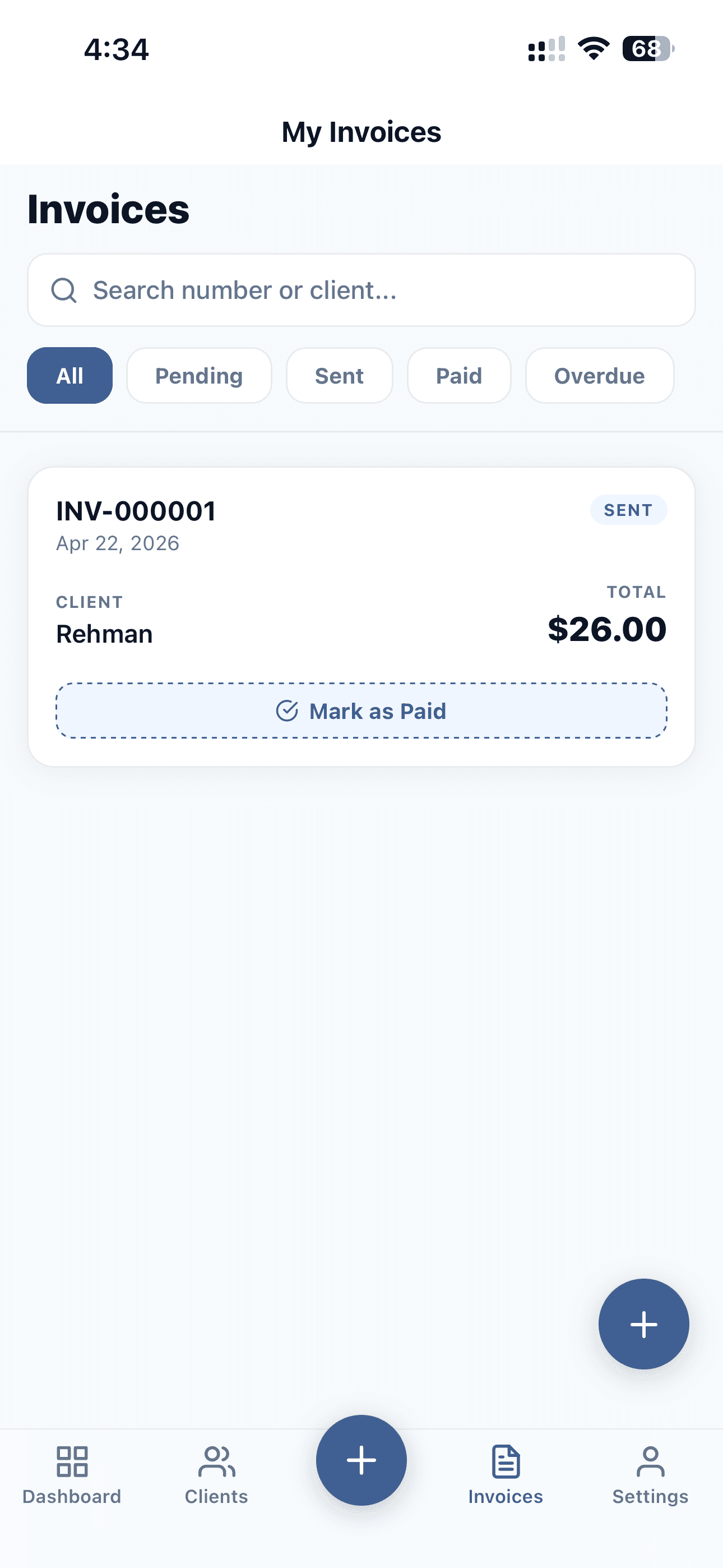
The mobile-first invoice generator for freelancers and small businesses. Send branded invoices, manage clients, and bill in any currency — with no laptop, and no connection required. Everything works offline and saves to your phone instantly.
Unlimited invoices free · No credit card required · Pro from $7.50/month
Invoices and clients, on every plan
Works with no connection at all
Branded PDF templates
Cloud backup, multi-device sync, no ads
Clean invoicing workflow built for people who value their time and their brand.
12 invoice templates — formal, minimal, technical, or premium. 3 are free, the rest unlock with Pro. Add your logo and signature once and every PDF looks the part, with no watermark on any plan.
Create, edit, and delete invoices and clients with no connection. Search, filters, dashboard totals, and the revenue chart all work offline, and every change saves instantly to your device.
Pro gives every invoice its own link and QR code. Send either one and your client opens the invoice in any browser — nothing to install, no account to make — then prints or downloads it themselves.
No stamp across your invoice, no “made with” line at the bottom, no branding but yours — on the free plan as much as on Pro. What your client opens looks like it came from your business, because it did.
With Pro your data backs up automatically in the background — on app start, after each change, and the moment you are back online. Sign in on a second device and everything downloads.
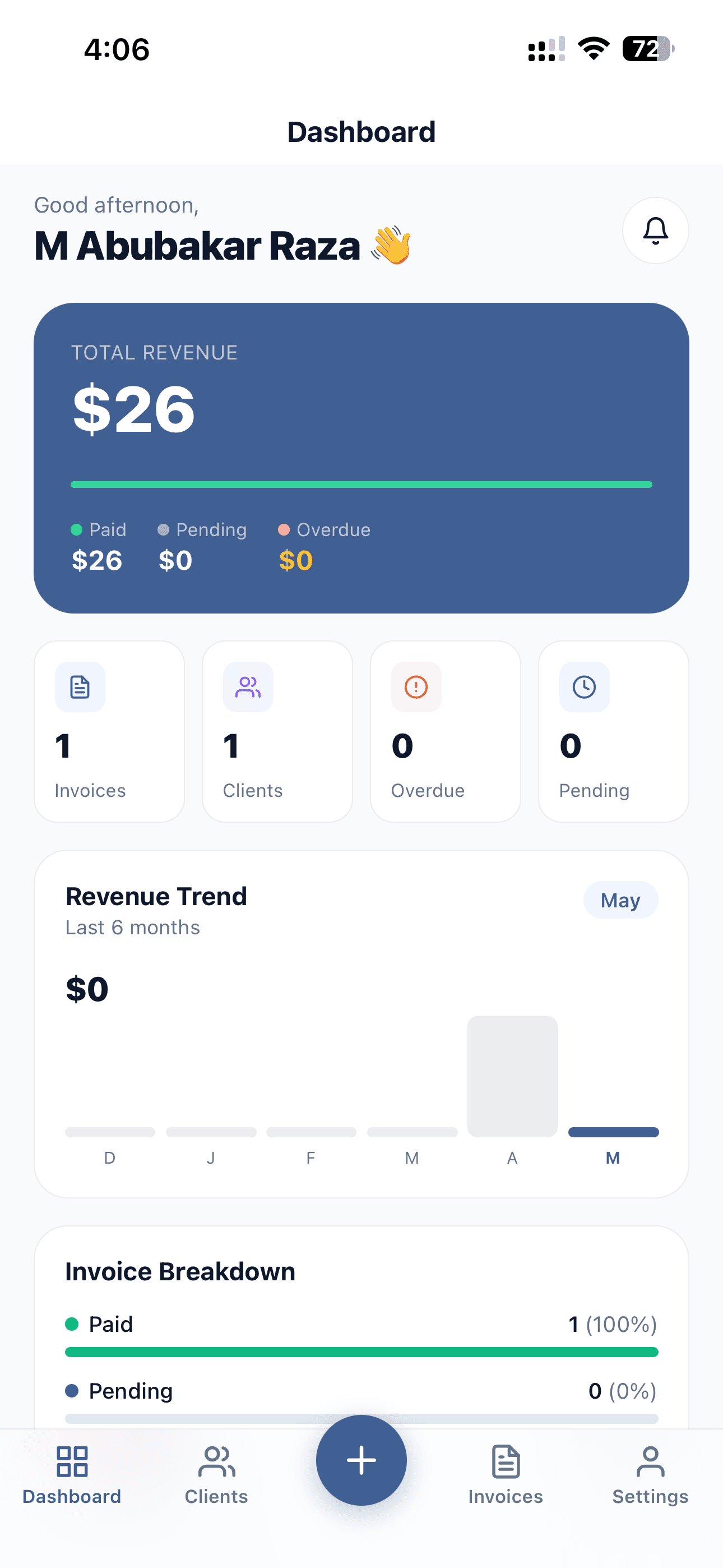
See total revenue, paid versus pending amounts, invoice breakdowns, and six-month revenue trends at a glance.
On a train, in a basement, on a client site with no bars — InvoiceNexora writes to your phone first, so nothing waits on a server. Pro adds a cloud copy in the background.
Settings · Cloud backup
On the train
You write three invoices with no bars.
Back on wifi
Nothing to press. Uploading starts on its own.
A moment later
Backed up, and already on your other device.
Create, edit, and delete invoices and clients with no connection at all. Search, filters, dashboard totals, and the revenue chart all work offline, and every change saves instantly because it never waits on a server.
Preview, share, and export branded PDFs with no connection — logo and signature included, because they are cached on your device rather than fetched from the web. Invoice numbers are generated on-device, so you never wait to start a new invoice.
Pro syncs automatically in the background — when you open the app, after each change, and the moment you are back online. Sign in on a new device and everything downloads. On Free, a manual backup file does the same job whenever you want it.
Free accounts keep everything on the device and can export a full backup file at any time. Pro adds automatic cloud backup and multi-device sync.
A guided flow that takes you from blank to professional PDF in under two minutes.
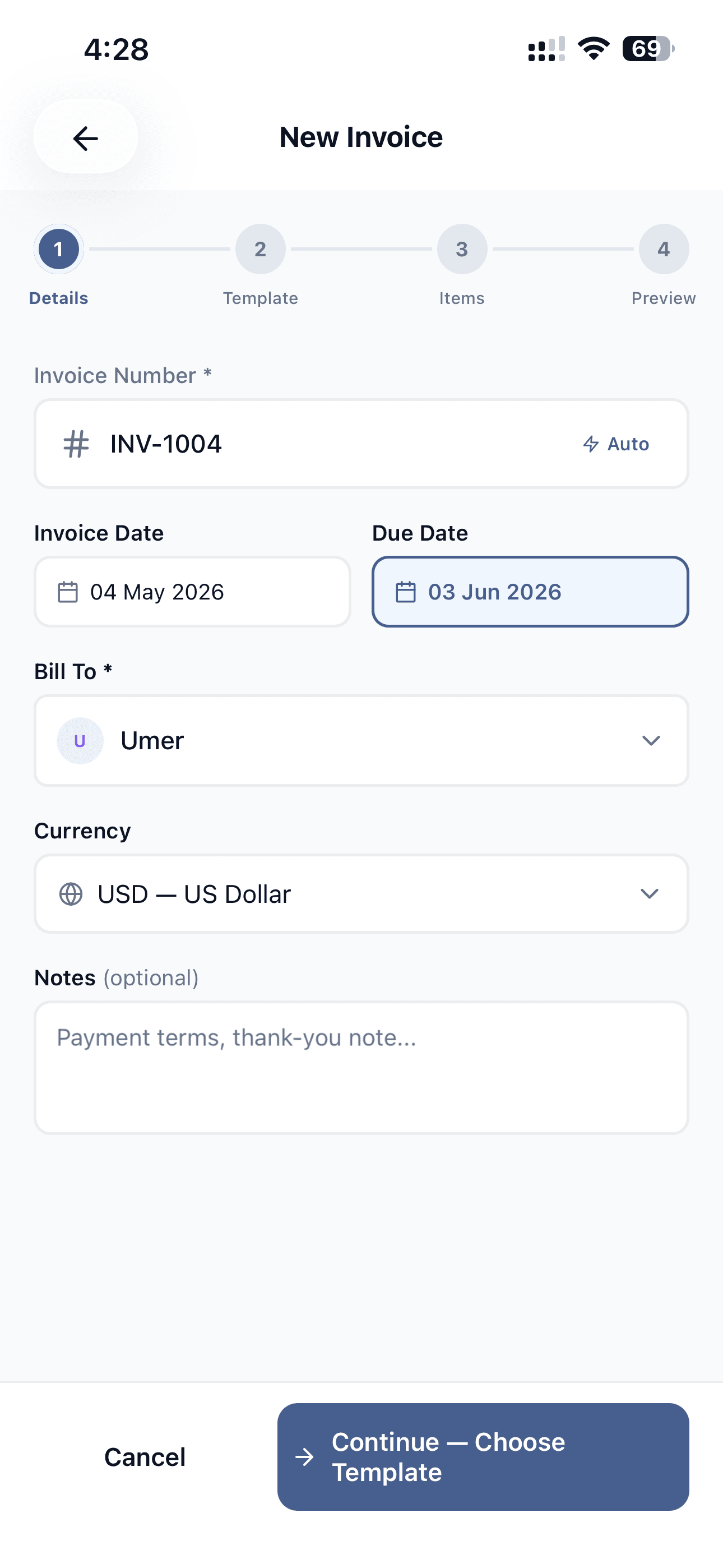
Set the invoice number, pick the invoice and due dates, choose a client, select the currency, and add optional notes or payment terms.
Auto invoice numbering
Sequential numbers generated automatically with your custom prefix.
Client auto-fill
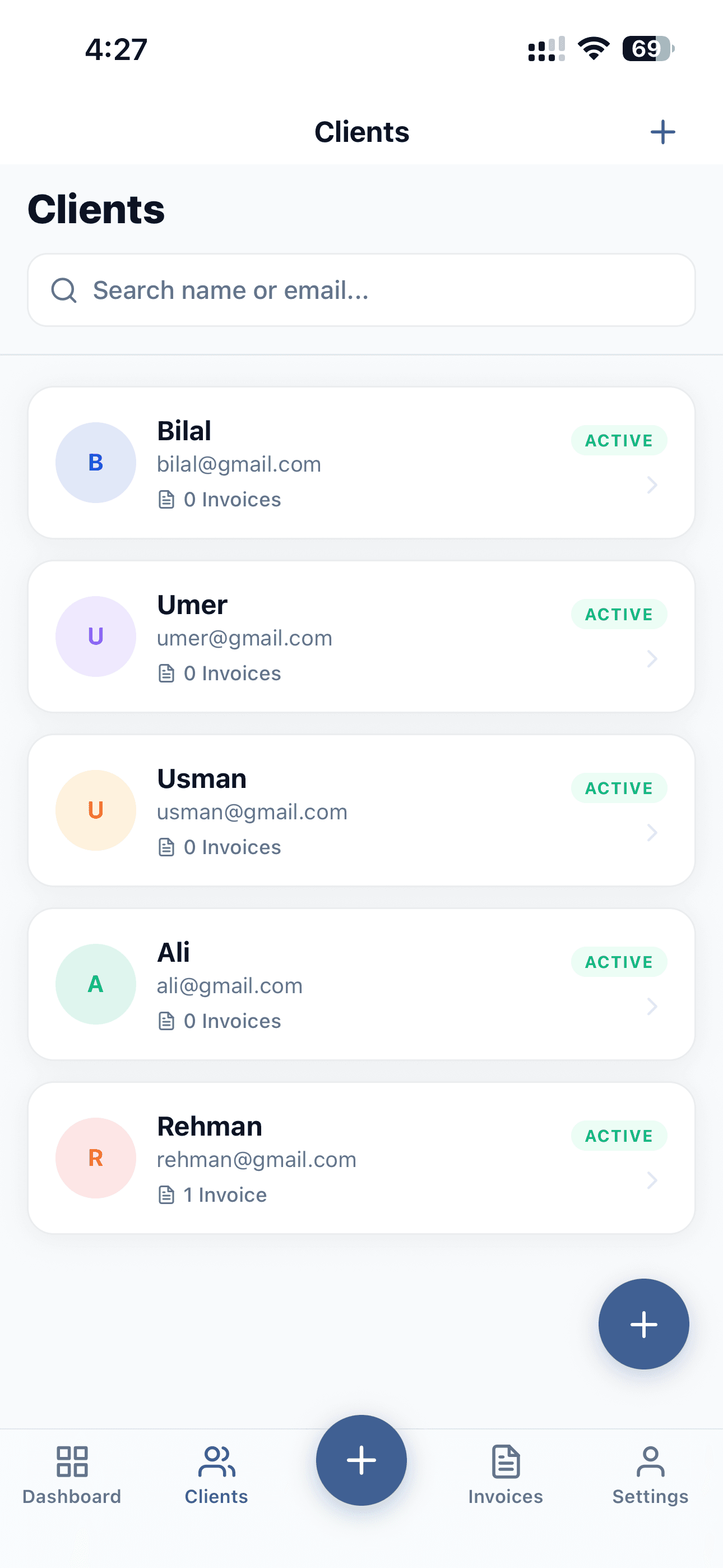
Pick from saved clients and their billing details appear instantly.
Multi-currency support
Invoice in any currency and override the default per invoice.
Every template renders the same branded PDF with your logo, signature, tax, discounts, and currency. Start free with Classic, Clean, and Minimal — Pro unlocks the other 9.
Timeless serif layout with navy and bronze accents.
Indigo gradient band with rounded meta cards.
Calm teal minimalism with hairline dividers.
High-contrast black and amber statement design.
Structured ruled-grid layout with monospace figures.
Warm cream ledger style with dashed rust rules.
Charcoal header with copper accents.
Friendly azure wave header with soft cards.
Elegant dark sidebar with gold serif details.
Editorial ink-on-white with light INVOICE wordmark.
Deep navy hero gradient with cyan highlights.
Corporate steel-blue cards with accent rail.
You can preview any template, including the Pro ones, before you decide. Switch template while you build an invoice and your details, line items, and totals carry straight over — the preview and the final PDF come from the same render engine, so what you see is what your client receives.
Founder note
InvoiceNexora was built by an indie developer in Pakistan after years of dealing with clunky invoice tools, scattered client data, and too much admin for simple freelance work. The goal is to make billing feel lighter, faster, and more honest.
"I'm trying to build the invoicing app I always wanted: simple enough for a busy freelancer, serious enough for client work."
M. Abubakar Raza
Founder and builder
Every free account gets unlimited invoices and clients, fully offline, with backup and restore — and never a watermark. Pro adds shareable invoice links and QR codes, automatic cloud backup and multi-device sync, all 12 templates and unlimited email reminders, and removes ads.
Free
InvoiceNexora Pro
$7.50 per month, billed yearly.
Subscribe inside the app. Manage or cancel anytime in your Google Play subscriptions.
Prices are shown in USD. Google Play converts to your local currency at checkout, so the exact amount you pay can vary by region and tax rules.
Free is the whole invoicing app, not a trial of it. Pro is what you buy when you want your invoices backed up, on every device, and the ads gone.
| Feature | Free | Pro |
|---|---|---|
| Invoicing | ||
| Invoices | Unlimited | Unlimited |
| Clients | Unlimited | Unlimited |
| Multi-currency, tax, and discounts | Included | Included |
| Status tracking from draft to paid | Included | Included |
| Revenue dashboard and charts | Included | Included |
| Invoice templates | 3 templates | All 12 templates |
| Email payment reminders | Not included | Unlimited |
| Watermark on your invoices | Never | Never |
| Sharing | ||
| Send and share invoice PDFs | Included | Included |
| Shareable invoice link | Not included | Included |
| QR code for each invoice | Not included | Included |
| Client prints or downloads from the link | Not included | Included |
| Offline | ||
| Create and edit with no connection | Included | Included |
| Offline PDF preview, share, and export | Included | Included |
| Logo and signature cached on device | Included | Included |
| Open the app with no connection | Included | Included |
| Your data | ||
| Manual backup and restore to a file | Included | Included |
| Automatic cloud backup | Not included | Included |
| Multi-device sync | Not included | Included |
| Everything else | ||
| Ads on list screens | Banners | None |
| Priority support | Not included | Included |
On the free plan, banners appear on the dashboard, invoice list, client list, and settings — never while you are filling in a form or previewing an invoice — plus an occasional full-screen ad after you export or share. Ads are hidden while you are offline, and nothing is ever added to the invoice PDFs your clients receive.
Quick answers about invoicing, clients, templates, PDFs, and how the current InvoiceNexora workflow is designed.
FAQ 1
InvoiceNexora is a mobile-first invoicing app for freelancers and small businesses. It helps you manage clients, create branded invoices, preview PDFs, send invoices, and track payment status from one streamlined workflow.
FAQ 2
Yes. InvoiceNexora has a permanently free plan with unlimited invoices and unlimited clients — there is no quota, no credit system, and no monthly allowance to track. No credit card is needed to start, and the free plan includes 3 invoice templates (Classic, Clean, and Minimal), branded PDFs with your logo and signature, full offline use, backup and restore, multi-currency invoicing, and status tracking.
FAQ 3
InvoiceNexora Pro is $9.99 per month or $89.99 per year (about $7.50 per month). Invoices and clients are unlimited on both plans, so Pro is what you buy for automatic cloud backup and multi-device sync: your data is backed up in the background and downloads to any device you sign in on. Pro also unlocks all 12 invoice templates instead of the free 3, lets you send unlimited payment reminders to clients by email, and removes ads from the app completely. Prices are shown in USD; Google Play converts to your local currency at checkout, so the exact amount can vary by region and tax rules.
FAQ 4
On the free plan you will see a banner on the dashboard, invoice list, client list, and settings screens, and occasionally a full-screen ad after you export or share an invoice — capped so it cannot appear more than once every few actions. There are never ads while you are filling in a form, previewing an invoice, or on the subscription screen, and there are never ads inside the invoice PDFs your clients receive. Ads are also hidden entirely while you are offline. Pro removes them everywhere.
FAQ 5
3 templates are free on every account: Classic, Clean, and Minimal. Pro unlocks the other 9: Modern, Bold, Grid, Ledger, Slate, Wave, Luxe, Horizon, and Executive. You can preview any of the Pro templates with your own invoice before deciding whether to upgrade, and if a Pro subscription lapses your invoices fall back to a free template rather than breaking.
Scan the QR code or tap to download. Unlimited invoices free, works offline, and never a watermark. iOS coming soon.
Scan the QR code with your phone camera, or tap the button below to open the Play Store listing.
iPhone and iPad invoicing is on the way. Join the waitlist and we'll email you the moment InvoiceNexora for iOS goes live.
Join the iOS waitlistUnlimited invoices free · Works offline · No watermark, ever
InvoiceNexorais live on Android today for freelancers and small businesses. Join the waitlist for early access to the iOS app - we'll email you the moment iPhone and iPad invoicing goes live.