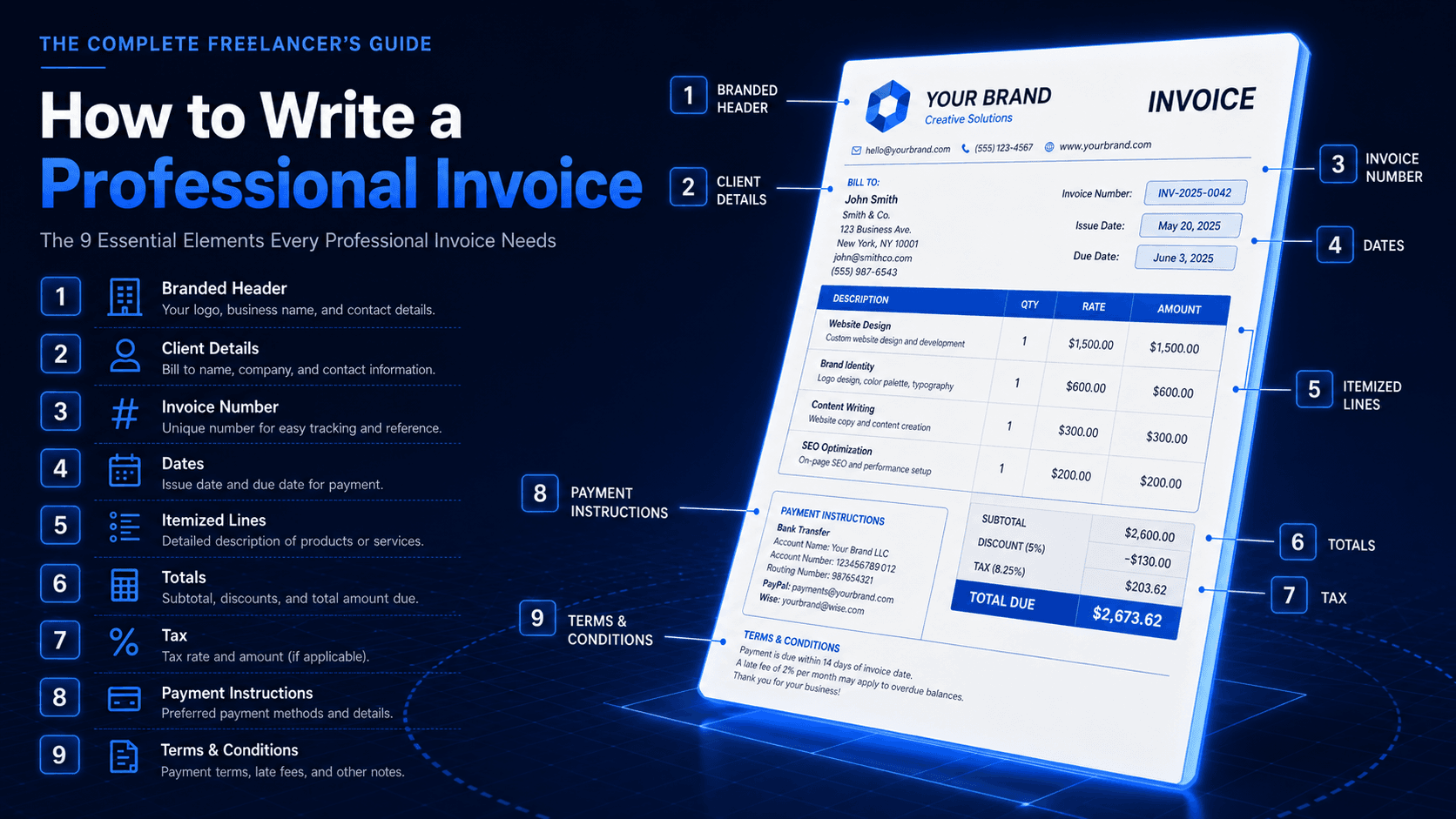
Cross-border work is the easiest way to grow a freelance business - the market is global, the talent pool isn't, and clients pay better when they're paying in stronger currencies. But the moment you invoice your first international client, you walk into a wall of decisions: which currency do you bill in, what exchange rate applies, who pays the bank fees, and how do you make sure the client understands the total at a glance?
Here's a practical playbook for multi-currency invoicing that won't quietly cost you 4% of every invoice.
Decision 1: Which currency should you bill in?
There are three sane options, and the right one depends on the relationship and the volatility of the currencies involved.
- Bill in the client's currency: Easiest for them, but you carry the FX risk. Best when your home currency is stable and you have a low-cost way to convert (Wise, Revolut Business, etc.).
- Bill in your home currency: Easiest for you, but creates friction for the client and may require them to absorb FX fees. Best when you're billing one-off or short engagements.
- Bill in a third stable currency (usually USD): The neutral option. Best for long engagements where neither side wants to track FX risk.
Decision 2: Always show the currency code
This is the smallest change with the highest impact. Don't just write "$1,200" - write "$1,200 USD" or "USD 1,200.00". A dollar sign is used by a dozen different currencies (USD, CAD, AUD, SGD, HKD, MXN, NZD - the list keeps going), and a client opening your PDF in Sydney shouldn't have to guess which one you meant.
The same applies to symbols like $ for pesos, kr for Scandinavian currencies, and especially £ vs. ₤. Always print the three-letter ISO code (USD, EUR, GBP, AUD, INR, JPY) next to the total.
Decision 3: Who pays the transfer fees?
International bank transfers have three places fees show up: the sender's bank charges an outgoing fee, intermediary banks can take "correspondent fees," and the receiving bank charges an incoming fee. The total can be $20-60 per transfer.
On the invoice, state explicitly who covers what. The cleanest standard is: client covers their outgoing fees, you cover your incoming fees. Anything else needs to be agreed up front. The line on the invoice can be as simple as: "International transfer fees are the responsibility of the sender."
Decision 4: Which exchange rate applies?
If you bill in the client's currency, the rate at the moment of conversion is what you receive in your home currency - and that rate moves daily. There are three ways to handle this:
- 01Accept the rate at payment time. Simplest. You take the FX exposure, but you also benefit when the rate moves your way.
- 02Lock the rate when the invoice is sent. State the rate on the PDF ("Billed at 1 USD = 1.07 EUR as of [date]"). The client can't argue once it's documented.
- 03Use a fixed rate buffer. Build a 2-3% buffer into your rates to absorb normal FX volatility. The cleanest option for long-term relationships.
Decision 5: VAT, GST, and the tax patchwork
Cross-border tax rules are the most jurisdiction-specific part of invoicing, but a few principles hold widely:
- If you're VAT-registered (UK, EU, and most of the world ex-US), you usually don't charge VAT on B2B services to clients outside your country - they self-account via reverse charge. State this on the invoice.
- If you're a US freelancer working with international clients, you typically don't charge sales tax on services exported abroad.
- Always include your tax registration number (VAT, GST, ABN, etc.) on the invoice. Clients will often need it for their own filing.
Decision 6: How to actually receive the money
The cheapest cross-border rail today is a multi-currency account: Wise Business, Revolut Business, Mercury, or Payoneer. These give you local account details in USD, EUR, GBP, and others - meaning your client can pay you as if they were paying a domestic client, and you control when to convert. Traditional SWIFT wires are still common in corporate settings, but the fees are 5-10x higher.
Add the relevant local account details to your invoice based on the client's currency. A UK client paying in GBP should see a UK sort code and account number, not a SWIFT/IBAN address.
Putting it all together: an international invoice checklist
- 01Currency clearly labeled with ISO code (USD, EUR, GBP) on every total
- 02Exchange-rate policy stated if billing in a foreign currency
- 03Fee responsibility line ("sender covers outgoing fees")
- 04Your tax registration number visible
- 05Reverse-charge or export-of-services note if applicable
- 06Local account details matching the client's currency, not yours
- 07Due date as a calendar date, not "Net 30" (international clients interpret durations differently)
Why this matters more than it looks
Every unclear line on a multi-currency invoice is a delay. If a client in Berlin opens your invoice and has to email back to ask whether $4,500 is USD or AUD, you've added a week to payment. If they have to ask about VAT, that's another week. Multi-currency invoicing is mostly the discipline of removing every reason for the client to pause.
InvoiceNexora was built for this exact use case - multi-currency by default, ISO codes shown on every total, branded templates that look the same whether you're billing in USD or INR, and the same mobile-first workflow regardless of the client's country. If most of your work crosses borders, the friction adds up fast, and a tool that handles it for you pays for itself in a single delayed wire.
Try InvoiceNexora
Send branded, professional invoices in under a minute.
Mobile-first invoicing for freelancers and small businesses. Templates, clients, multi-currency, and clear payment tracking - all from your phone.